
Organizational Structure Users
Review the Organizational Structure documentation as users are related to it.
Section Purpose:
This documentation describes how to assign users to organizational structure units and how hierarchical access to sub-units works.
Basic Information
Section titled “Basic Information”- The Users tab is available in the view of each organizational unit
Users are assigned directly to specific units in the organizational structure. Access to units is hierarchical – this means that a user assigned to a given unit automatically gains access to all its sub-units (subordinate units) and their resources.
How does it work?
Section titled “How does it work?”- Assigning a user to a parent unit gives them automatic access to all subordinate units in the structure tree.
- There’s no need to separately grant permissions to each sub-unit – it’s enough to assign the user to the appropriate level in the hierarchy.
- The user sees all prescriptions and resources from the unit they’re assigned to, as well as all its sub-units.
Example
Section titled “Example”If a user is assigned to the “Internal Medicine Department” unit, they automatically gain access to:
- Clinical IT Section (sub-unit)
- Sub-department 2 (sub-unit)
- All other sub-units that may be created in the future within this department
Assigning Users to a Unit
Section titled “Assigning Users to a Unit”Step by Step
Section titled “Step by Step”- Go to the selected organizational unit view.
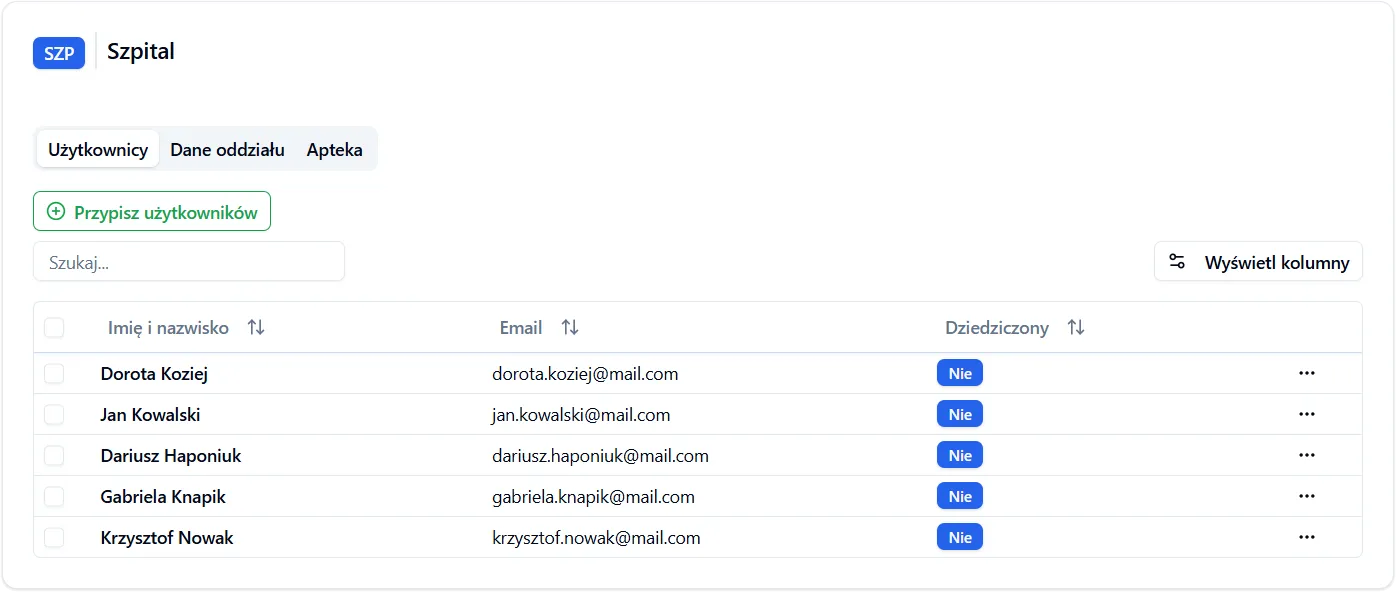
- Click the “Add” button in the users section.
- A list of available users in the system will appear.
- Select the user or users you want to assign to the unit.
- After confirmation, the users will appear on the list in the unit view.
View in Application
Section titled “View in Application”The list of assigned users is visible directly in the organizational unit view after selecting it from the list. You can see all users who have access to the given unit and manage them (add or remove).
Frequently Asked Questions
Section titled “Frequently Asked Questions”Can I assign a user to multiple units?
Yes, a user can be assigned to multiple units, as long as they are not in a subordinate relationship (i.e., none of them is a sub-unit of another). This way the user gains access to all sub-units of each assigned unit.
What does a user assigned only to a sub-unit see?
A user assigned to a sub-unit sees only that sub-unit and its possible sub-units. They don’t have access to the parent unit or units at the same hierarchy level.
Can I revoke a user assignment?
Yes, you can remove a user from the list assigned to the unit. The user will immediately lose access to this unit and all its sub-units (unless they have access through another parent unit).