
Delivery Routes
Section Purpose:
This documentation describes what delivery routes are, what properties they have, and how to manage their list in the system. Delivery routes are used in the pharmacist view for prescriptions with home treatment.
Basic Information
Section titled “Basic Information”Each delivery route has the following property:
- Name – delivery route name (e.g., “Downtown”, “North District”, “Route A”)
Application
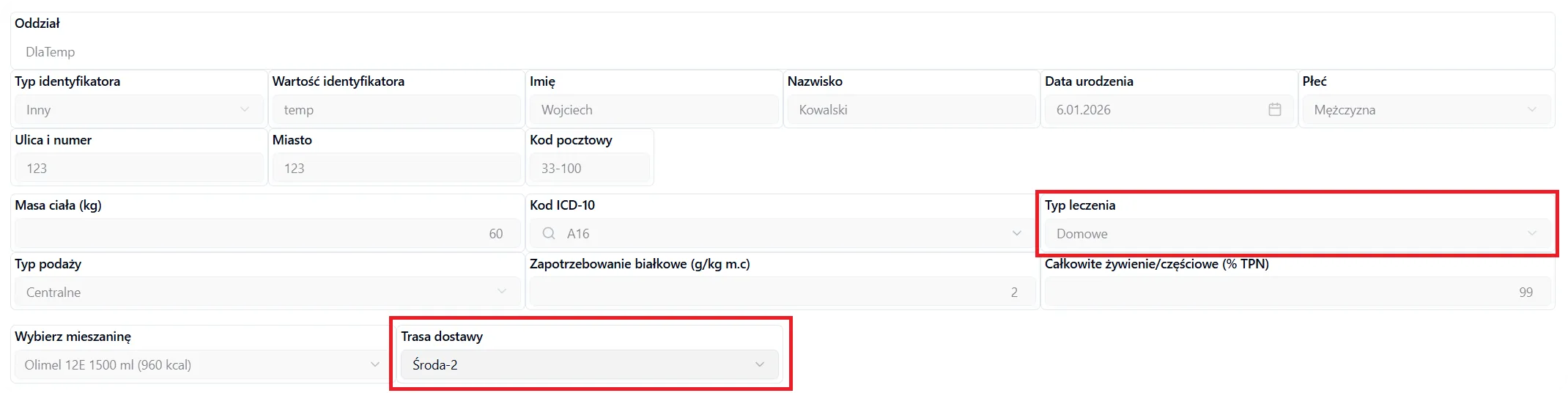
Section titled “Application”Delivery routes are used in the pharmacist view during prescription verification. Only pharmacists have access to select delivery routes.
When is the delivery route available?
Section titled “When is the delivery route available?”The delivery route selection appears in the pharmacist view only when:
- In the patient data section of the prescription, the treatment type “Home” is selected
What happens with the selected route?
Section titled “What happens with the selected route?”The selected delivery route is assigned to the prescription and is then visible on the label printed for the bag. This allows production and delivery staff to easily identify which route should be used to deliver the prescription.
Managing Delivery Routes
Section titled “Managing Delivery Routes”In the delivery routes view, you can:
- Add a new route – click the “Add Delivery Route” button and provide the route name
- Edit a route – you can change the name of an existing route
- Archive a route – routes that are no longer used can be archived
- Search routes – use the search field to quickly find a specific route
Frequently Asked Questions
Section titled “Frequently Asked Questions”Who can add and edit delivery routes?
Only users with appropriate permissions (e.g., administrator or pharmacist) can manage delivery routes.
Can I delete or edit a delivery route?
Yes, you can edit the route name or archive a route that is no longer used. However, remember that the route is stored as a snapshot when creating a bag. This means that if you later edit or delete the route, the bag label will still show the route name from the time it was created. The new or changed route name will only be available for newly created bags.
What happens if I don’t select a delivery route for a home prescription?
Selecting a delivery route is required for prescriptions with home treatment type. Without selecting a route, you will not be able to continue with the bag acceptance process.
Are delivery routes visible to doctors?
No, delivery routes are visible and accessible only to pharmacists in the pharmacist view. Doctors do not have access to this field.