
Production – Bags
Section Purpose:
This documentation describes the bag list – production orders created based on prescriptions. It contains information on viewing bag details, printing labels, and recreating bags in case of errors.
Basic Information
Section titled “Basic Information”The bag list displays all production orders in the system that have been accepted by the pharmacist in the pharmacist view. Each bag is associated with a specific prescription and contains detailed information about mixture preparation.
Each bag has the following properties:
Example for prescription number RNI-23-01-2026-V1
-
Bag Number – unique identifier of the bag in the system.
- Prescription number (4 digits) – extracted from prescription number =>
0023 - Month (2 digits) – month of prescription creation =>
01 - Short year (2 digits) – last two digits of the year =>
26 - Version (1 digit) – prescription version =>
1 - Sequential number (4 digits) – ordinal number of bag for given prescription (0001-9999)
- Suffix (optional) – specifies bag type for individual neonatal prescriptions of “2-in-1” type:
B– bag (BAG)S– syringe (SYRINGE)
for prescription
RNI-23-01-2026-V1, the first bag will have number0023012610001, - Prescription number (4 digits) – extracted from prescription number =>
-
Prescription Number Identifier – number of the prescription based on which the bag was created.
-
Patient – patient for whom the mixture is being prepared.
-
Bag Type – 3-in-1 Bag or 2-in-1 Bag.
-
Preparation Date – when the bag should be prepared.
-
Days of Validity – how long the bag will be valid.
-
Number of Bags – number of bags being prepared.
-
Status – current bag status (Pending, In Preparation, Ready, Sent, Delivered).
-
Label – printed label with bag details and barcode.
Bag List
Section titled “Bag List”The bag list works similarly to the prescription list – it displays a table with all production orders.
Bag List View in Application
Section titled “Bag List View in Application”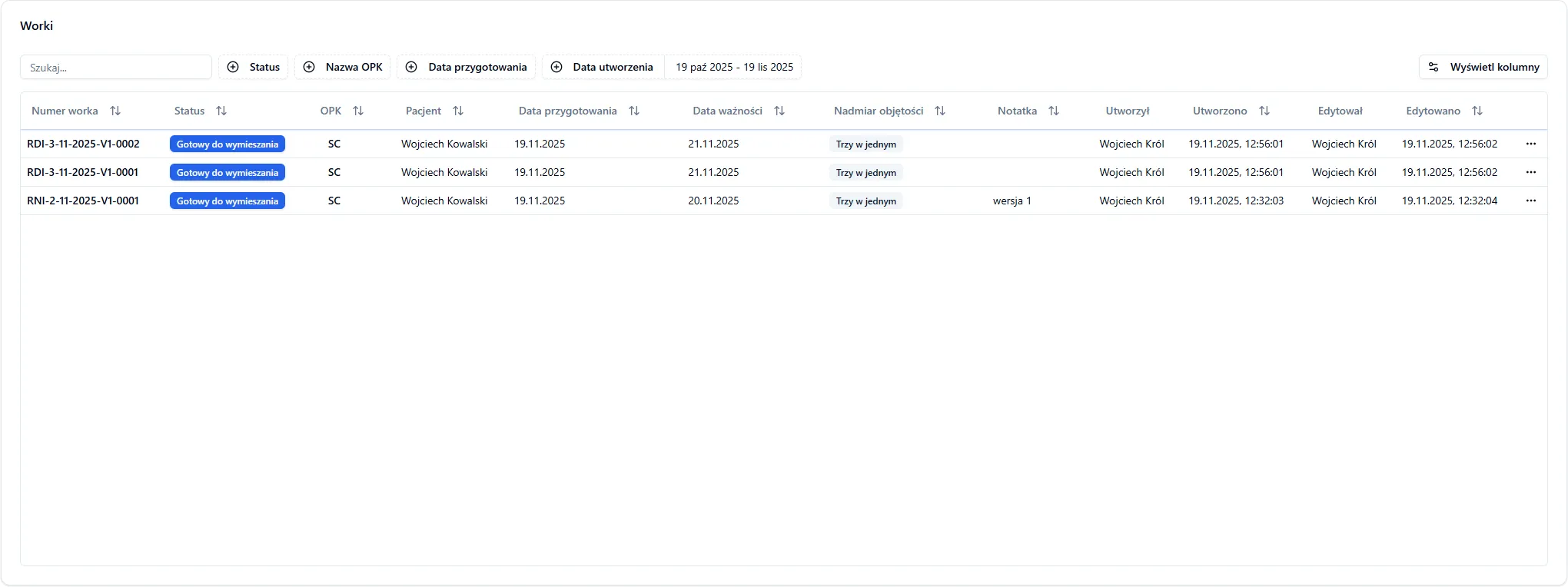
Actions Available for Bag
Section titled “Actions Available for Bag”Depending on bag status, different operations are available:
- Display details - bag details and label appearance
- Reprint label
- Retry bag creation - Function available in case of bag creation error in pharmacist view. Enables going through the bag creation process again without having to re-accept the prescription.
- Confirm delivery - Changes bag status to “Delivered” after confirming that the bag was delivered to the patient.
- Report destruction - Changes bag status to “Destroyed” in case the bag was destroyed (e.g., due to expiration).
Bag Statuses
Section titled “Bag Statuses”Each bag goes through successive states in the creation and fulfillment process:
| Status | Description |
|---|---|
| Pending | Bag has just been created and is waiting to be sent to the server |
| Ready for Compounding | Bag has reached the server and is ready for compounding |
| During Compounding | Bag was scanned on the compounder and file extension changed |
| Created | Bag was successfully created and file extension changed |
| Applied | Bag was delivered to the patient |
| Creation Error | Error occurred during bag creation (compounding) |
| Canceled | Bag was canceled (e.g., at patient or physician request) |
| Destroyed | Bag was destroyed (physically) |
| Transfer Error | Error during data transfer or label printing – possible bag recreation |
Frequently Asked Questions
Section titled “Frequently Asked Questions”Can I edit a bag after creation?
No – bag parameters (type, date, validity, quantity) cannot be edited after creation. In case of error, you can use the “Retry bag creation” function.
What happens if the printer is not available?
If the printer is not available, you can select a different print service or try again later. The bag will remain in the system and you can try printing again using the “Reprint label” button.
Can I create multiple bags for one prescription?
Yes – in the pharmacist view you can add multiple bags for the same prescription. Each bag will have its own number and label. After accepting the prescription, you can add more bags without going through the acceptance process again.
What’s the difference between “Reprint label” and “Retry bag creation”?
- Reprint label – for use when the bag was already correctly created, and you only need a new label printout.
- Retry bag creation – for use when something went wrong during bag creation in the pharmacist view.