
Prescription
Section Purpose:
This documentation describes a prescription in the system – its structure, properties, statuses, and available operations. It contains information on creating, editing, managing, and viewing prescriptions.
Basic Information
Section titled “Basic Information”Each prescription has the following properties:
-
Prescription Number Unique identifier – the number consists of:
- prescription type,
- number of dispensed prescriptions,
- date (month-year),
- version.
Pattern:
RNI-1-11-2025-V1 -
Status – current prescription status (e.g., Dispensed, Fulfilled, Canceled).
-
Cost Center – organizational unit where the prescription was dispensed.
-
Patient
-
Physician
Prescription List
Section titled “Prescription List”| Prescription Number | Status | Cost Center | Patient | Physician |
|---|---|---|---|---|
| RNI-1-11-2025-V1 | Dispensed | CH | Jan Nowak | Dr. Kowalski |
| RNI-2-11-2025-V1 | Fulfilled | CH.CIT | Maria Lewandowska | Dr. Wiśniewski |
| RNI-3-11-2025-V2 | Canceled | CH.IMD | Piotr Zając | Dr. Nowak |
Prescription List View in Application
Section titled “Prescription List View in Application”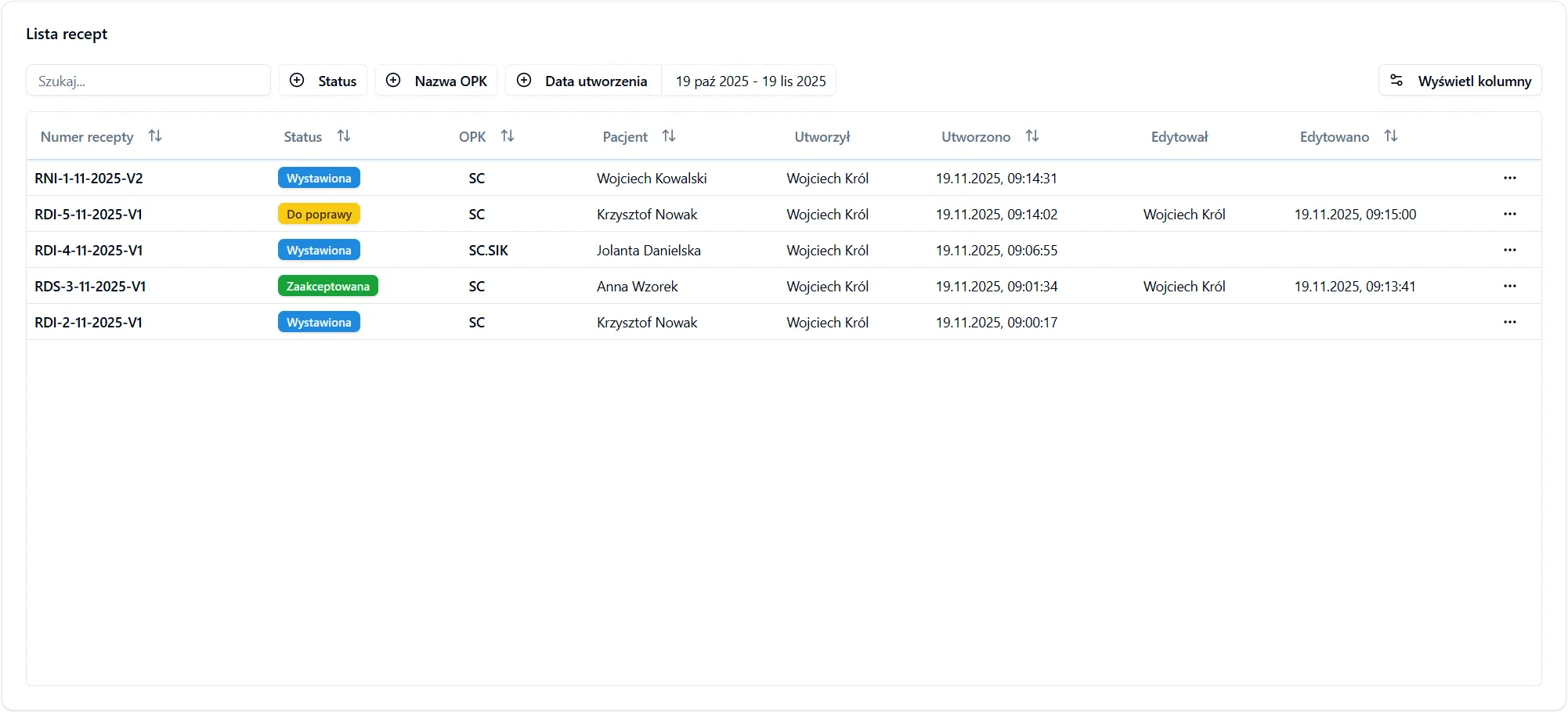
Actions Available for Prescription
Section titled “Actions Available for Prescription”Depending on the prescription status and user permissions, different operations are available:
- Pharmacist View – enables creating an order from the prescription.
- Display – displays prescription PDF.
- Download – downloads prescription PDF.
- Edit – enables going to the prescription form view to edit its data.
- Clone – enables creating a new prescription based on the selected one, with automatic transfer of all data.
- Display History – opens a view where previous prescription versions are visible.
- Cancel – cancels the prescription.
Frequently Asked Questions
Section titled “Frequently Asked Questions”Can I change the patient in an existing prescription?
No. If you want to change the patient, you must use the Clone function – you’ll create a new prescription based on the selected one and indicate a different patient. The original prescription will remain unchanged.
What is the impact of editing a prescription on its number?
Each prescription edit increases its version (e.g., from V1 to V2). The history of all changes is available in the prescription history view. The base prescription number remains unchanged.